⛨
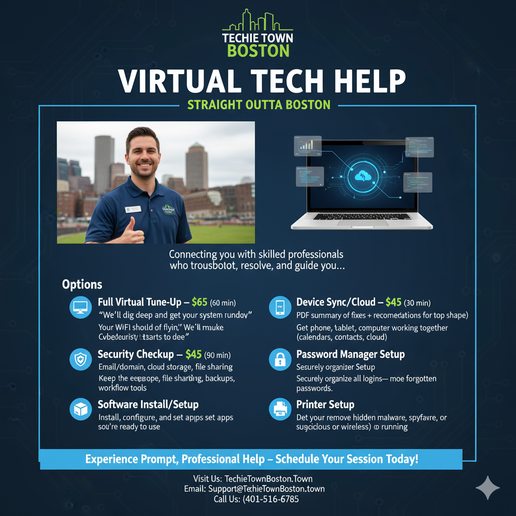
Fast, security-first remote help desk support from Cambridge, MA — serving Boston businesses and clients nationwide.Remote & Virtual IT Support (24/7) + Managed Cybersecurity — Techie Town Boston
Remote IT Support That Actually Fixes the Root Cause (Not Just the Symptom)
We provide professional remote IT support for businesses and individuals — troubleshooting, configuration, security hardening, account recovery, performance repairs, and help desk support. You get fast triage, clean documentation, and practical cybersecurity baked into every session.
During business hours we aim to respond within ~1 hour (often faster). After-hours response varies by queue and coverage.
Remote Support Tools We Use / Support (Official Links)
We choose tools based on your environment, device type, and security needs. Many sessions can run with built-in or lightweight options. You always approve access, and you can end the session at any time.
What We Can “Repair” Remotely (And How We Do It)
Remote support isn’t just “screen sharing.” It’s structured triage + root-cause repair, with security and stability checks baked in. Below are common issues we resolve in remote sessions.
| Problem | How We Fix It | Typical Result |
|---|---|---|
| Slow computer / freezing / crashes Windows + macOS |
Startup cleanup, storage health checks, OS + driver updates, software conflict isolation, browser cleanup, performance tuning. | Faster boot, smoother apps, reduced crashing, clear “next steps” if hardware is the bottleneck. |
| Email not working / login loops Microsoft 365 + Google Workspace |
Account sign-in repair, MFA reset planning, Outlook/Gmail configuration, mailbox rules cleanup, security review for compromise indicators. | Email restored, safer sign-in, fewer lockouts. |
| Security scare / malware symptoms Popups, redirects, suspicious extensions |
Browser + extension audit, system scans (as appropriate), removal guidance, patching, hardening, safer defaults + prevention plan. | Cleaner system + reduced risk of repeat infections. |
| Wi-Fi/network instability Drops, slow speeds, dead zones |
Remote diagnostics: device tests, router configuration review, channel/interference guidance, mesh placement strategy, firmware checks. | More stable network and a clear plan if ISP or hardware replacement is needed. |
| Business user/device setup Onboarding, standardization |
Account provisioning guidance, device configuration, security baseline checklist, password manager rollout, backup/recovery planning. | Cleaner operations, fewer “one-off” problems, better security posture. |
How to Prepare for Your Remote Appointment (So We Finish Faster)
The best remote sessions are the ones where we can connect quickly and focus on fixing — not hunting for info. Here’s the pro checklist.
What to include in your request (copy/paste template)
Service type: Remote / Virtual IT Support
Device: (Windows PC / Mac / Laptop / Desktop) + model if known
Issue: symptoms + when it started + error messages
Accounts involved: Microsoft 365 / Google Workspace / Gmail / Outlook (if relevant)
Urgency: low / medium / high
Availability: 2–3 time windows (or “after-hours requested”)
Contact: phone + email
Remote & Virtual IT Support (24/7 Options) + Managed Cybersecurity
Techie Town Boston is a mobile and virtual IT support company based out of Cambridge, Massachusetts (appointment-only — no walk-in storefront). We deliver professional remote IT support, managed IT services, and cybersecurity hardening for small businesses, startups, and high-expectation home offices across Greater Boston and nationwide.
During business hours, we aim to respond within 1 hour.


Remote IT Support Services (Nationwide)
Professional remote computer repair, virtual IT support, and help desk troubleshooting for Windows and macOS — built for speed, clarity, and security.
Remote Troubleshooting + Fixes
Crashes, slow performance, boot issues, software conflicts, drivers, updates, and stability tuning.
Email + Account Recovery
Microsoft 365, Google Workspace, Gmail/Outlook setup, MFA issues, sign-in loops, safer account recovery.
Security Cleanup + Hardening
Malware guidance, browser cleanup, patch strategy, safer defaults, device encryption guidance, risk reduction.
Remote Network Diagnostics
Wi-Fi reliability, dead zones, router settings, DNS issues, VPN connectivity, device-to-printer access.
New Device Setup + Migrations
New computer setup, backups, file migration, email profile rebuilds, security baseline setup.
Business Help Desk Support
Ongoing user/device support with priority options, documentation, and consistent cybersecurity hygiene.
Managed Cybersecurity (Practical, Not Theatrical)
Most security failures come from fundamentals being skipped: weak sign-in, messy admin access, inconsistent updates, no backups, and no recovery plan. We build a clean baseline and keep it maintained.
Identity + Access (MFA Done Right)
MFA rollout, admin lock-down, recovery planning, safer sign-in, permission cleanup in Microsoft 365 and Google Workspace.
Endpoint Hardening + Patch Strategy
Update cadence, device encryption guidance, safer browser defaults, extension hygiene, and minimizing quiet vulnerabilities.
Phishing Risk Reduction
Practical guardrails: mailbox best practices, safer link behavior, role-based guidance, and prevention-first workflows.
Backup + Recovery Planning
Backup strategy guidance, restore testing recommendations, and ransomware-aware recovery planning.
Support Options: One-Time Help or Ongoing Managed IT
Choose a one-time remote session or go managed for priority support, proactive maintenance, and stronger cybersecurity. Pricing is confirmed in writing before work proceeds.
One-Time Remote Support
Fast troubleshooting for urgent issues, email setup, tune-ups, and quick fixes.
-
Typical starting range (market estimate) Edit to match your real pricing before publishing.$99+
Monthly Support Membership
Recurring help desk support + maintenance check-ins + faster response windows.
-
Typical starting range (market estimate) Edit to match your real pricing before publishing.$299/mo+
Managed IT + Cybersecurity
Proactive support + security baseline + ongoing risk reduction (coverage-based).
-
Typical starting range (market estimate) Often priced per-user/per-device; discovery required.$125/user+
How Remote Support Works (Fast, Secure, Documented)
The secret sauce is boring excellence: clean intake, secure access, verified fixes, and clear documentation. That’s how you get “high-end tech company” results without the nonsense.
Business Hours
Mon–Fri: 8:00 AM – 8:00 PM
Sat–Sun: 10:00 AM – 5:00 PM
We’re mobile/virtual (no walk-in storefront). Office base: Cambridge, MA.
Typical Response Time
We aim to respond within 1 hour during business hours (often faster). For urgent issues: text URGENT TECHIE to 401-516-6785.
24/7 Remote Help Desk
24/7 remote support options are available worldwide for managed clients (coverage-based) and for approved urgent after-hours situations.
Cancellation Policy (Brief)
Please provide at least 24 hours’ notice to cancel or reschedule. Late cancellations/no-shows may be subject to reserved-time charges and/or deposit requirements for future bookings.
Data + Security Handling (Brief)
We follow a “minimum access” mindset: we avoid storing credentials, and when possible, clients enter passwords and 2FA themselves. We document changes and prioritize safer defaults, patch hygiene, and recovery planning.
Authorization + Scope (Brief)
Work begins after service approval. For managed services and larger business work, a service agreement and/or deposit may apply. Scope and pricing are confirmed in writing before proceeding beyond the approved plan.
Platforms We Commonly Support
Windows • macOS • Microsoft 365 • Google Workspace • Gmail/Outlook • Wi-Fi networks • printers/scanners • backups • migrations. If your environment is unusual, we’ll tell you quickly what’s realistic and what’s not.
FAQ (Quick Answers)
Do you offer remote IT support nationwide?
Yes — remote and virtual IT support is available across the United States. We’re based in Cambridge, MA and operate mobile/virtual (no storefront).
Can you secure our Microsoft 365 or Google Workspace?
Yes — MFA rollout, safer sign-in, recovery planning, admin lock-down, and practical cybersecurity hardening are core services.
What do you need from me to start?
Device type, the main symptoms, urgency, and the best contact method. For businesses: user/device count and what’s most urgent.
What if the issue requires on-site work?
We’ll tell you quickly. On-site IT support is available across Greater Boston by appointment when remote isn’t the right tool.
Electronics Repair Pricing & Turnaround — Boston + Cambridge
We provide professional electronics diagnostics and repair planning for devices that require bench testing, deeper inspection, or parts coordination. We’re a mobile and virtual IT + electronics repair business based out of Cambridge, MA (appointment-only). No storefront — we come to you, handle pickup/drop-off, or guide you remotely when that’s the fastest path.
Phone & Tablet Repairs (iPhone / Android / iPad)
Common fixes: screen replacement, battery replacement, charging/port issues, camera swaps, and device hardening after compromise.
-
Screen replacement (glass + display) Model-dependent (LCD vs OLED, newer flagships cost more).$125–$500+
-
Battery replacement Fast drain, shutdowns, swelling risk — safety check included.$59–$150
-
Charging / port issues Clean + diagnose; replace port when needed (USB-C / Lightning).$90–$180
Consoles + Controllers (PS5 / Xbox / Switch)
Common failures: HDMI no-signal, overheating/shutdown, fan and power issues, and controller stick drift.
-
HDMI port repair / replacement (micro-soldering) Board-level precision work on PS5/Xbox/PS4/Xbox One.$175–$275
-
Overheating / deep clean / thermal service Dust removal + thermal inspection; helps prevent shutdown/throttling.$90–$200
-
Controller repair (drift, buttons, ports) Diagnose and repair stick drift, button failure, charging issues.$45–$120
Laptop & Computer Repairs (Mac / Windows)
We commonly service MacBook, Dell, HP, Lenovo, ASUS, Acer, Microsoft Surface, and custom PCs.
-
Overheating / fan noise / thermal service Cleanout, thermal materials, heatsink inspection (when applicable).$80–$180
-
Performance upgrades + tune-up SSD/RAM guidance + malware cleanup + stability optimization.$99–$249
-
Battery replacement + power diagnostics Battery health + charging verification.$129–$299
Micro-Soldering & Board-Level Repair
Ports, connectors, pads/traces (when viable), intermittent power faults — microscope work when required.
-
Bench diagnostic Root-cause analysis before any high-risk repair work.From $50
-
Port replacement (HDMI / USB-C / charging) Precision soldering + inspection.$150–$400
-
Data extraction support (limited cases) When a device won’t boot, we evaluate safe extraction options.Quoted
Typical Repair Process (Professional Workflow)
Clear intake → real diagnostics → written approval → repair + QA. No mystery meat “we’ll see what happens.”
Fast Booking Template (7 Questions) — Copy/Paste
This is the fastest way to get triage + scheduling handled cleanly. Below is a pre-filled example (best-educated default), plus a blank template you can reuse.
Example (Pre-Filled)
Blank Template (For Clients)
24/7 Remote IT Support — Typical Response in ~15 Minutes
Techie Town Boston provides fast, secure remote help worldwide—whether you’re a home user, a remote worker, or a small business. The fastest way to start: text our support line and we’ll reply with next steps (and a secure remote session link when needed).
> Tip: Tap “New Ticket” then “Text This Ticket” to get started fast.
-
Ticket CreatedWe’ve received your request.
-
Assigned to TechnicianYou’ll get a text/email update.
-
Remote Session ReadySecure one-time session link (if needed).
-
In ProgressLive troubleshooting + fixes.
-
ResolvedWe confirm everything is working.
-
Follow-UpAftercare + prevention tips.
Optional Enable true live status (backend hook)
This widget works instantly as a client-side tracker and “live console.” For a real live portal, set a secure JSON endpoint in the script (your ticket system / CRM / Airtable / RepairDesk / etc.).
What we can fix remotely (fast)
- Slow computer / startup issues: cleanup, optimization, storage health checks, startup tuning.
- Wi-Fi & network problems: dropouts, mesh tuning, router configuration, DNS, speed troubleshooting.
- Email issues: Outlook/Gmail setup, sync errors, send/receive problems, spam filtering.
- Malware / popups: removal, browser cleanup, security hardening.
- Software installs: Microsoft 365, printers, drivers, Zoom/Teams, VPN, business apps.
- Printer setup: wireless printing, scan-to-email, network printer troubleshooting.
- Backup & recovery: OneDrive/Google Drive, local backups, restore planning.
- Account lockouts: password resets, MFA/2FA fixes, device security checks.
- Small business help desk: user onboarding, permissions, shared folders, workflow fixes.
- Remote training: quick sessions to teach you the fix so it stays fixed.
Remote support terms (quick + clear)
Remote support requires a working internet connection and device access. Some issues (hardware failures, physical damage, certain network cabling, or electrical work) may require onsite service or referral to licensed electricians. Response time of ~15 minutes is a typical goal for 24/7 intake; times may vary based on ticket volume, complexity, and required escalation. We’ll always confirm scope and pricing before proceeding.